Decima8 IDE
Visual environment for baking neuromorphic personalities
Status: Public
Version: 1.0
🏗️ What is Decima8 IDE?
Decima8 IDE is a visual environment for baking neuromorphic personalities. Here you manually configure tiles, weights, and thresholds while observing the recognition process in real-time.
Open D8Type
D8Type runs in the browser on top of the reference Decima-8 C core. The
initial session opens the tipograf_v01.d8p OCR personality with the compact
eng_small.vsb tape. The swarm resets after every detected solution before
processing the next image.
Tile edits live only in the laboratory process memory and never overwrite the source personality on the server. Reloading the pair restores the golden state.
🏗️ IDE Interface
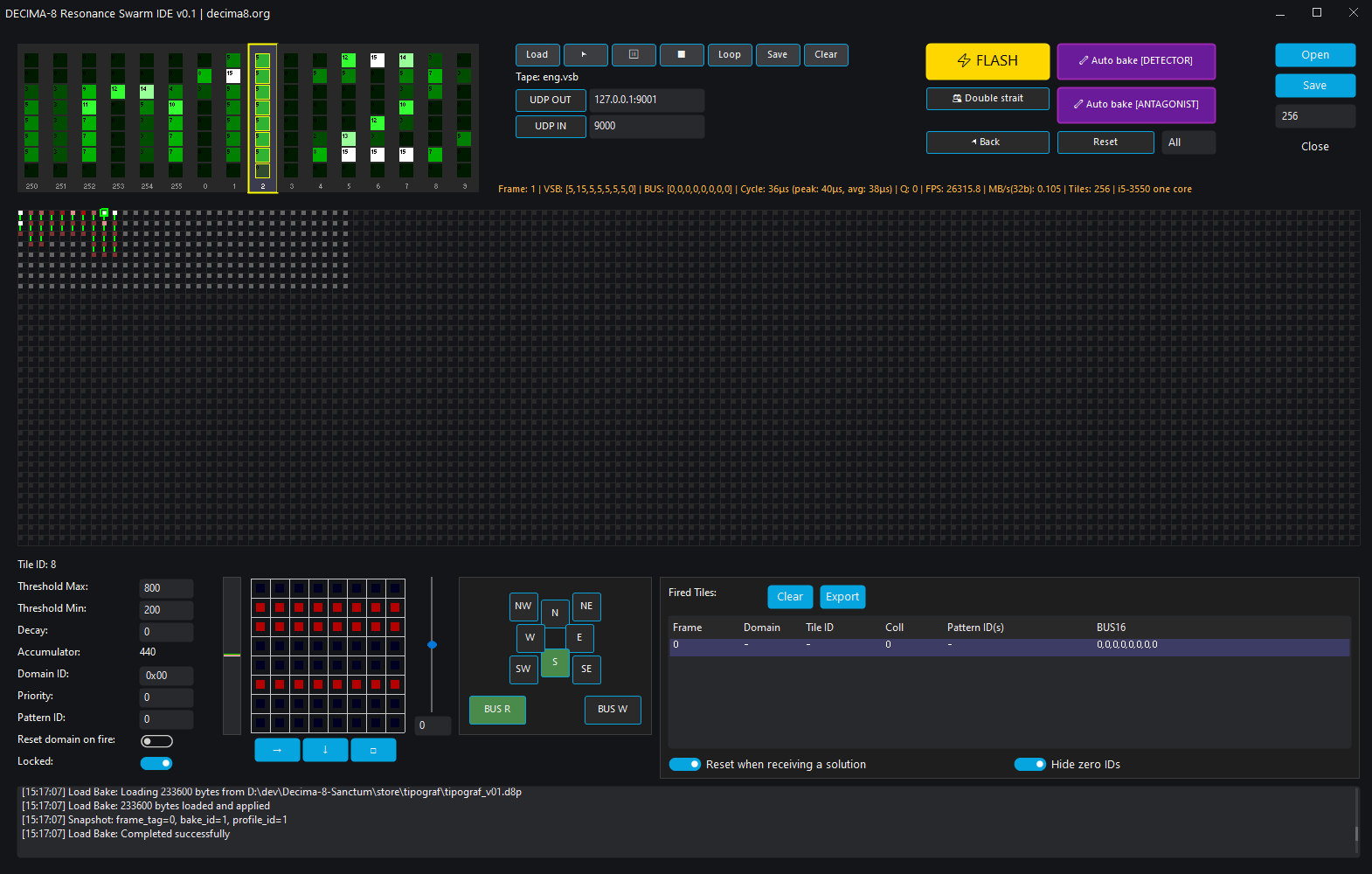
Visual baking environment: input pattern accordion, tile swarm, parameter and solution panels
🧩 Interface Components
🛠 Control Panel
| Button | Function |
|---|---|
| ▶ FLASH | Run EV_FLASH cycle |
| ⏸ RESET | Reset accumulators of selected domain or all |
| 🔁 Auto-Bake | Automatic baking under pattern |
| ⚙ Swarm Params | Global settings (size, domains) |
🪗 Accordion (Input Patterns)
VSB tape — Visual representation of input data:
| Parameter | Description |
|---|---|
| 8 columns | 8 lanes VSB[0..7] |
| Values 0..15 | Level16 |
| Tape scrolls | Data fed by ticks |
Pattern Example:
Tick 1: [5, 10, 3, 8, 12, 0, 7, 15] → Recognition "5"
Tick 2: [0, 2, 7, 1, 9, 4, 6, 3]    → Recognition "0"
🕸 Swarm (Tile Array)
Tile array visualization:
| Element | Description |
|---|---|
| Each tile | One neuron with local memory |
| Color | Activity (thr_cur16) |
| White | Locked status (fuse latched) |
| Arrows | Children activation directions (N,E,S,W...) |
Display Modes:
| Mode | Description |
|---|---|
| Weights | 8×8 weight matrix |
| Activation | Current thr_cur16 |
| Routing | Routing flags |
🎛 Tile Parameter Panel
Click on tile to open editor:
| Parameter | Description | Range |
|---|---|---|
| BUS_R | Historical name: make the tile an ACTIVE-graph root | 0/1 |
| BUS_W | Write to bus (WRITE phase) | 0/1 |
| Threshold | Fuse range [thr_lo..thr_hi] | -32768..+32767 |
| Decay | Decay force to zero | 0..32767 |
| Pattern ID | Recognized pattern ID | 0..32767 |
| Domain | Reset group | 0..15 |
| Priority | Winner on collision | 0..255 |
| Directions | Children activation (N,E,S,W,NE,SE,SW,NW) | 8 bits |
🎯 Solution Panel
Recognized patterns output:
| Field | Description |
|---|---|
| Pattern | Recognized pattern ID |
| Confidence | Confidence (0..1) |
| Tile ID | Which tile made decision |
Output Example:
[EV_FLASH]
frame_tag,domain_id,tile_id,collision,pattern_ids,bus16
2,0,256,0,1,0|0|0|0|0|0|0|0
8,0,385,0,2,0|0|0|0|0|0|0|0
13,0,386,0,3,0|0|0|0|0|0|0|0
🔄 Workflow
1. Load Personality
1. Open personality (.d8p file)
2. Swarm shows tile topology
3. Load vsb tape from file or enable UDP listening
4. Accordion shows VSB chords - what's fed to machine input
5. If tape loaded from file, can press FLASH / BACK / RESET to run patterns
6. When working via network, swarm reacts to chords from socket
2. Configure Tiles
1. Click on tile in swarm
2. Configure thresholds, weights, decay
3. Set activation directions
4. Repeat for all tiles
3. Baking
1. Select required chord in accordion (right-click)
2. Select tile that should latch on it
3. Press 🔁 Auto-Bake
4. IDE selects weights for pattern
5. Check FLASH, adjust firing corridor
6. Save as .d8p
4. Recognition
1. Press ▶ Play
2. Tape moves through swarm
3. Solution panel shows recognized patterns
4. When working via network, swarm reacts to chords from socket
🤗 AI Agent (Coming Soon)
In development — AI agent for automatic weight and topology selection:
| Stage | Description |
|---|---|
| Task | You set pattern bank and target metrics |
| Agent | Runs machine, selecting weights and topology |
| Result | Ready baked personality for store |
Bake the Future. Build the Substrate. 🛠️⚡️